
Save
Positive and negative text
Keep both sides of a saved prompt so the negative text does not get lost when you return to an idea.
Keep the ideas worth returning to. Save positive and negative prompts from your Library, find them again and copy them for your next generation.
Included in Free and Pro. Desktop app for Windows, macOS and Linux.
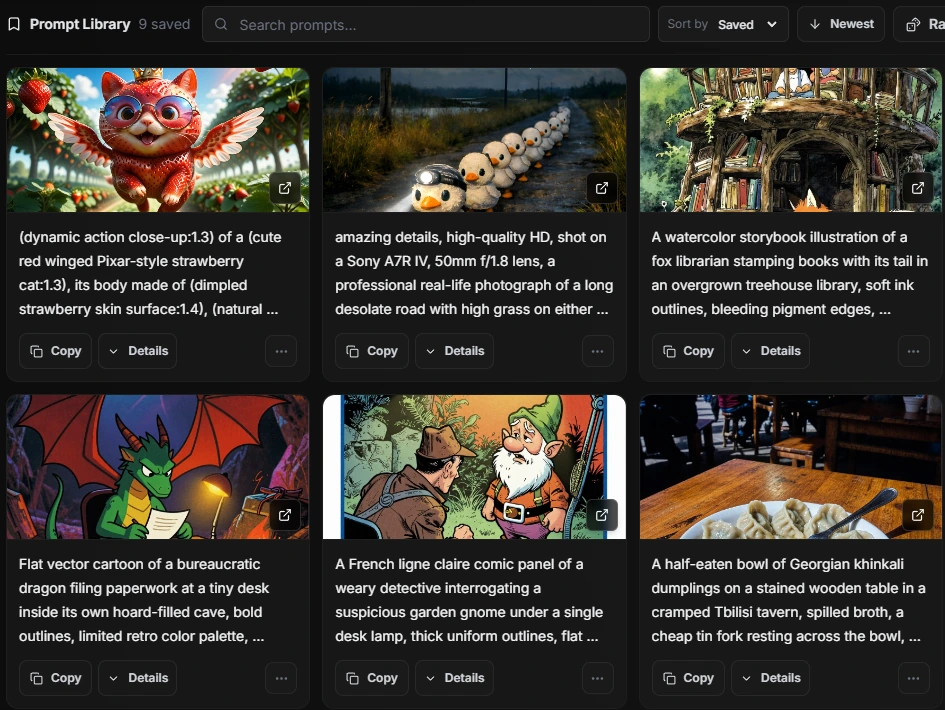
You already have the generation. Keep its prompt somewhere you can find it again.
Use Save Prompt on an image with prompt text. Keep its positive and negative text in your personal Prompt Library.
Search saved prompt text, sort the collection or use Random to rediscover something you kept.
Copy the text for another generation, or return to the source image when it is available.
Keep both sides of a saved prompt so the negative text does not get lost when you return to an idea.
Search across saved positive and negative text. Sort by when you saved a prompt or by its source date.
Random picks from the prompts in your current results, helping you revisit ideas you might otherwise forget.
Copy saved text and use it in your next workflow. Prompt Library preserves ideas you saved; it does not generate new prompts for you.
Source previews and View Source keep the result within reach when its original file is available.
Saved prompts remain local to the app. Remove a saved entry when it no longer belongs in your collection.
No. Prompt Library is included in both Free and Pro.
No. It is a personal collection inside Image MetaHub, built from prompts you save from your own indexed Library.
Your saved prompt text remains available to search and copy. The source preview and View Source depend on the original image being accessible.
Prompt Library stores saved prompts locally. Cloud synchronization is not part of this feature.
Yes, when Image MetaHub has extracted the prompt text from a supported image. Copying a prompt reuses its text; executable ComfyUI workflow inspection and generation are separate app features.
Start a personal Prompt Library with the free desktop app.