
Sync
Zoom once, not twice
Pan and zoom drive both panes together, so you are always looking at the same crop instead of hunting for it twice.
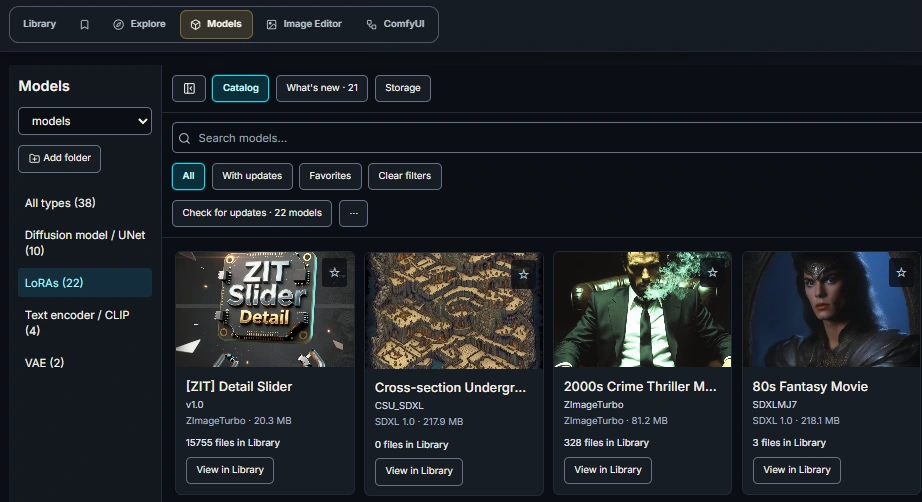
Organize your local LoRAs and checkpoints, track model updates and find their associated images. Generate and compare from inside your library with direct ComfyUI and Automatic1111 integration built in.
One-time lifetime license. Prefer a subscription? Monthly and annual plans are available below. 14-day no-questions-asked refund. Works with your existing free install.
Every image indexed with its full generation context, filterable by checkpoint, LoRA, sampler, scheduler and ComfyUI node, grouped into the sessions that produced them. That part is free. Pro is everything below it.
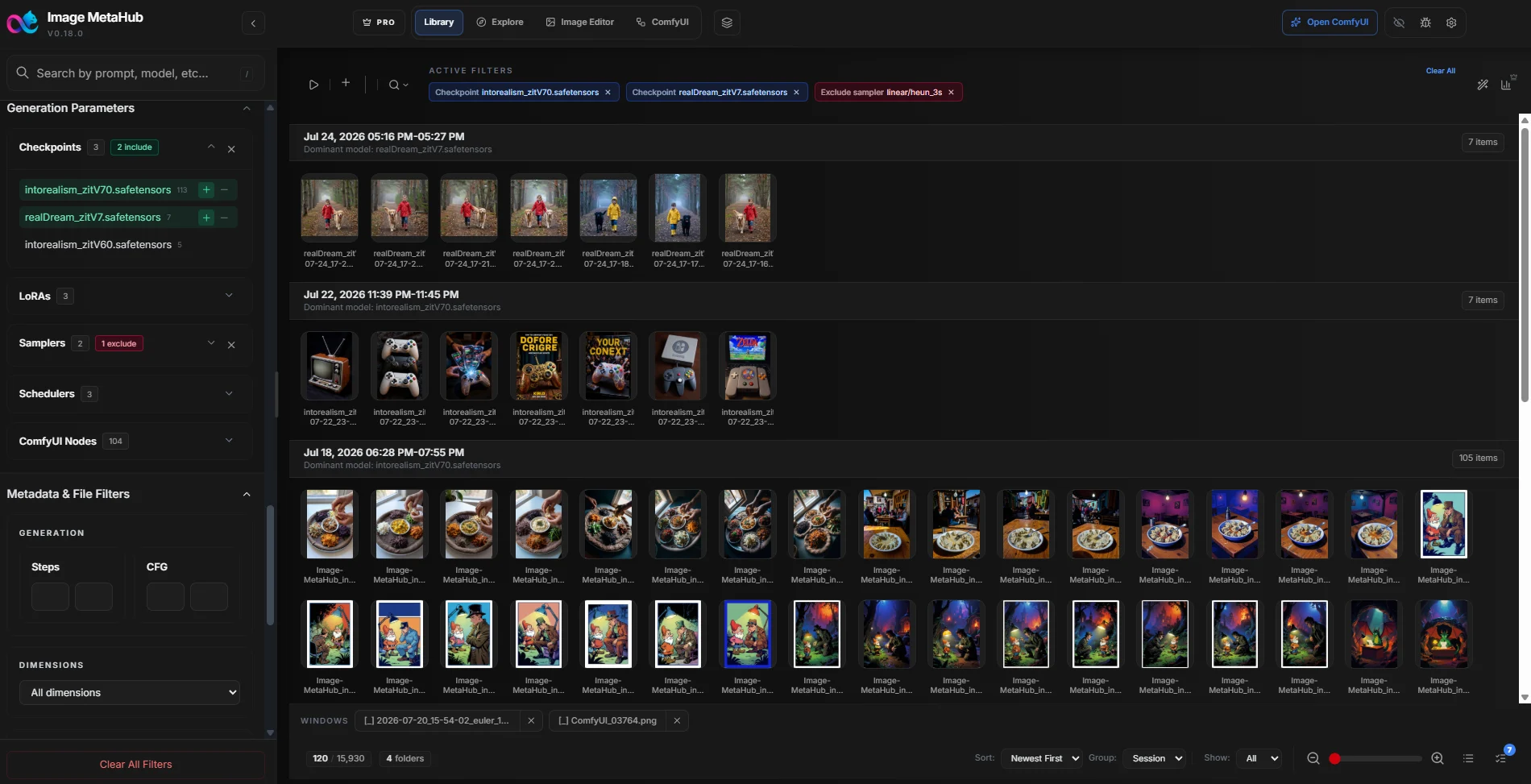
Turn model folders into a visual catalog. Keep covers, favorites, tags and notes together, track Civitai and Hugging Face updates, and jump to associated images in your Library.
Models for generation, from LoRAs to checkpoints — alongside your existing media library.
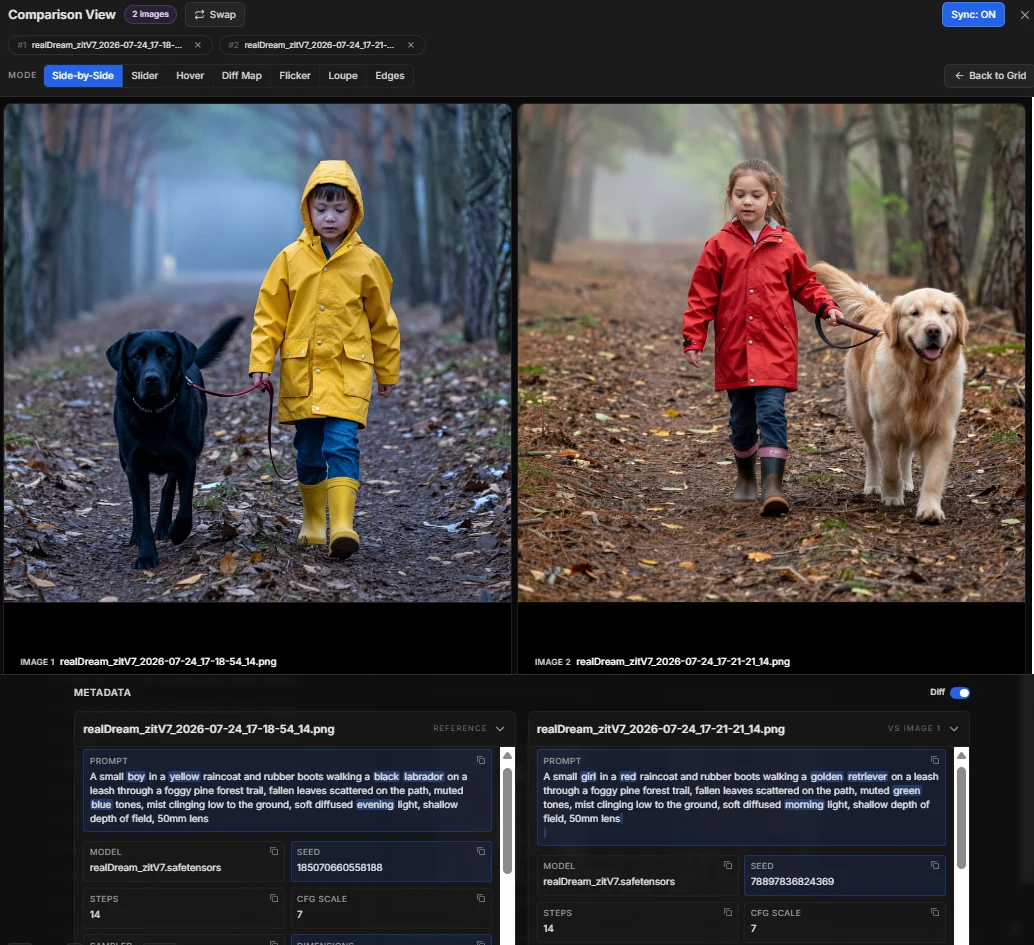
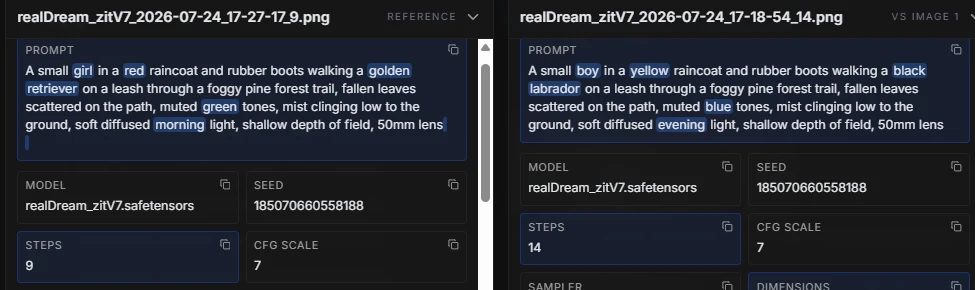
Put 2 to 4 outputs side by side and Image MetaHub diffs their metadata for you — highlighting the exact prompt words, seeds, steps, CFG and samplers that differ. No more guessing which of six tweaks moved the result.
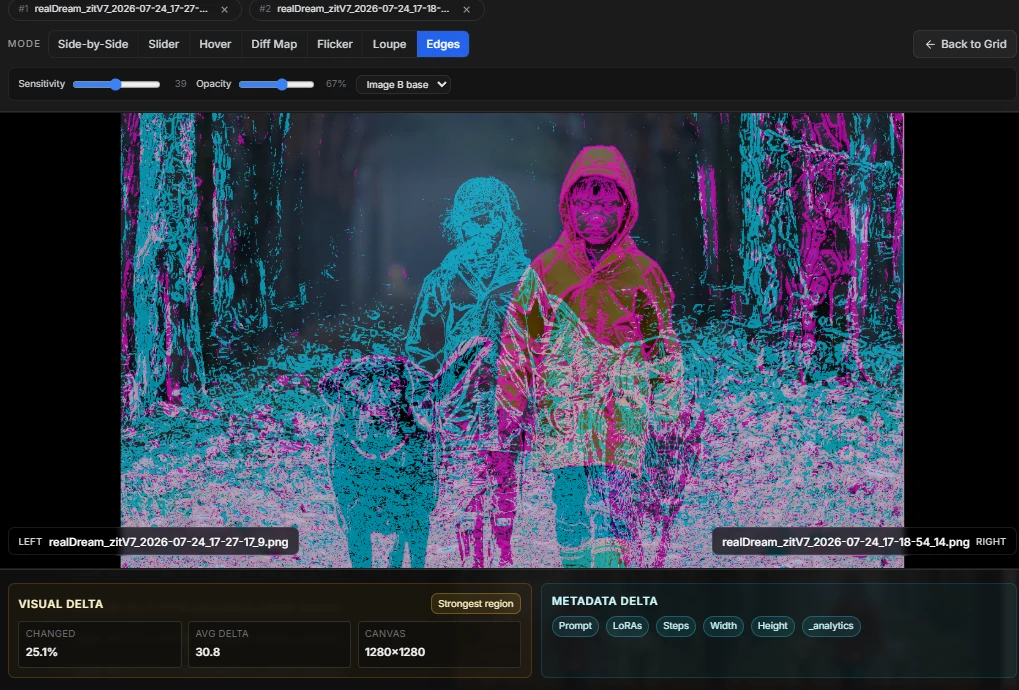
Side-by-side, slider, hover, flicker, diff map, loupe and edge detection — with synced pan and zoom, a quantified visual delta, and a jump to the strongest-changed region.
Pan and zoom drive both panes together, so you are always looking at the same crop instead of hunting for it twice.
Changed percentage, average delta and canvas size, so "basically the same" becomes a measurement.
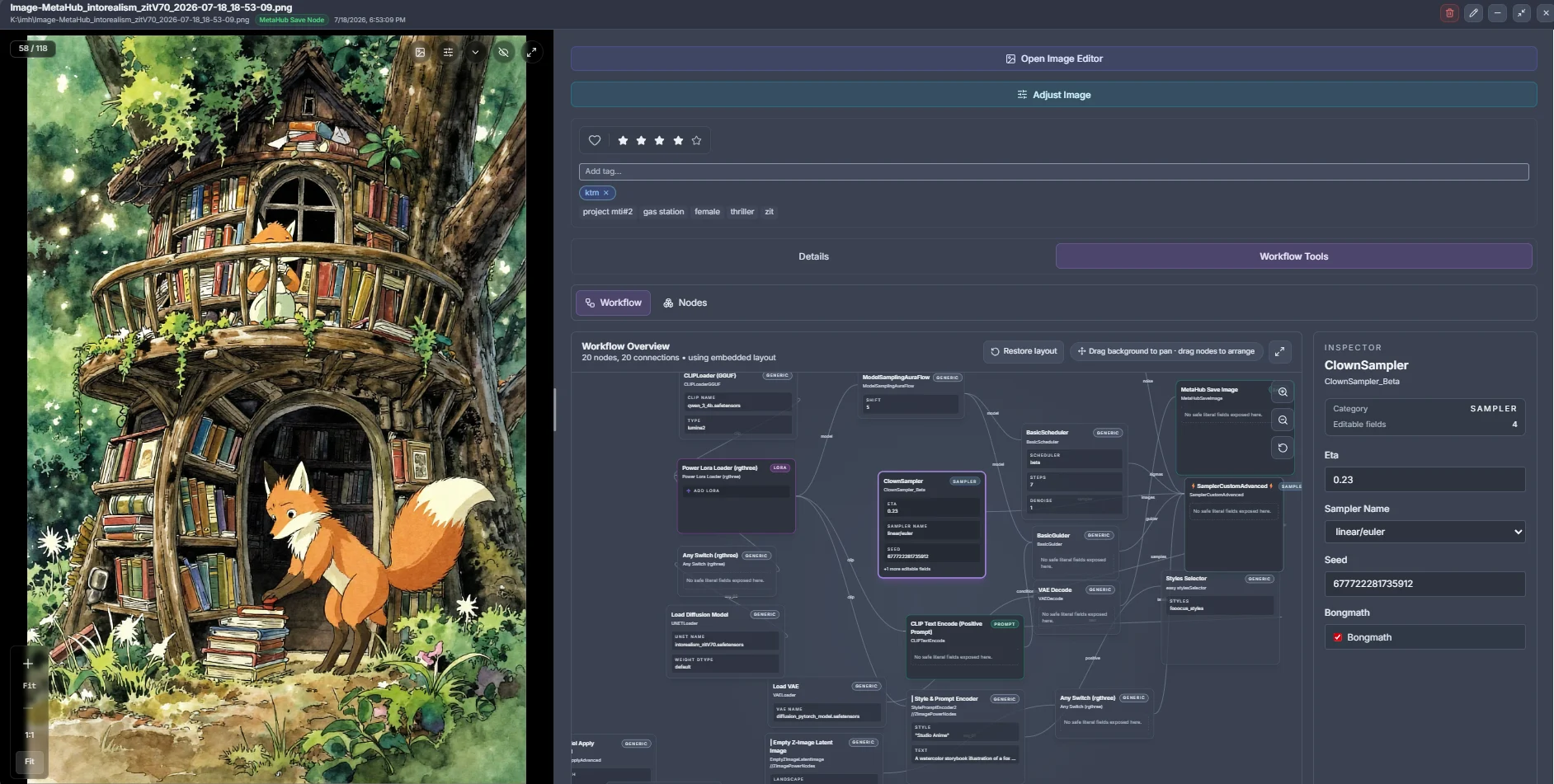
Open any ComfyUI output and Image MetaHub reconstructs the graph that made it — every node, every connection, with an inspector for the values that matter. Then send it back to ComfyUI or Automatic1111 and generate again.
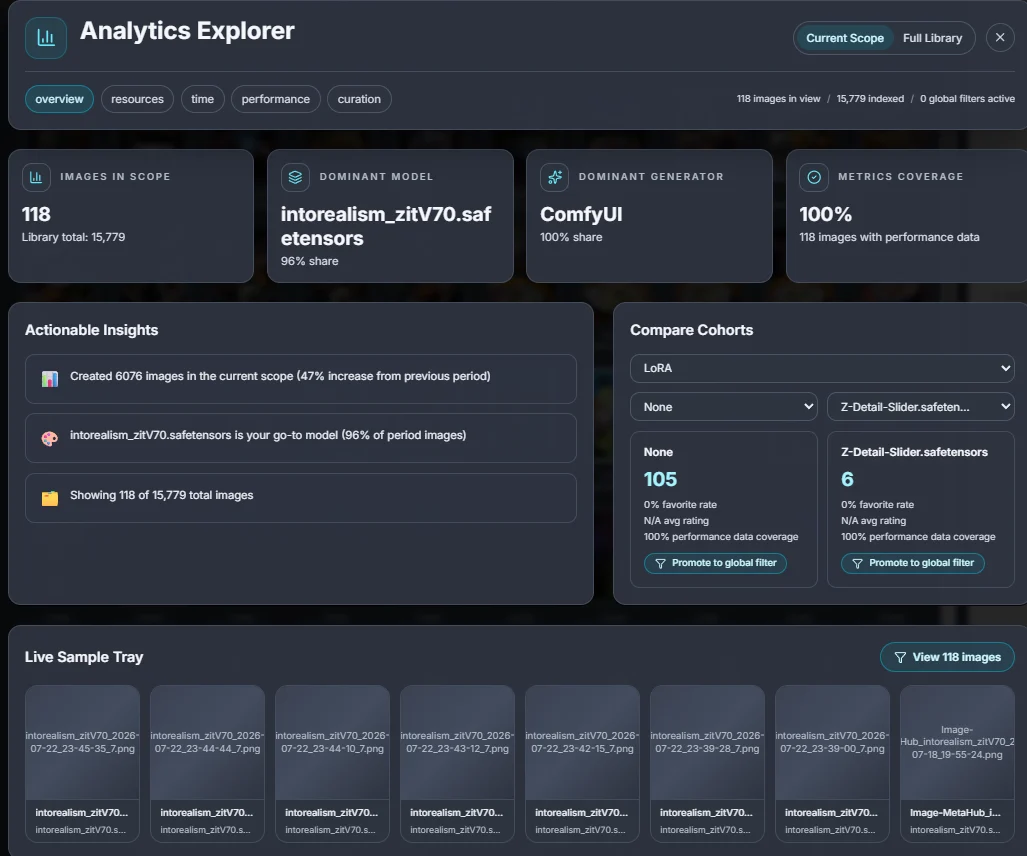
Which checkpoint really produces your keepers, which LoRAs you loaded twice and forgot, how your output volume moves over time. Scope it to a filtered set or the whole library, then compare cohorts directly.
Pro also includes a built-in image editor — adjustments, crop, rotate, resize, sharpen, annotations, text and blur regions — that writes back with your generation metadata intact, so an edited file never loses its prompt.
The free version is the real app, not a crippled trial. Pro adds Model Manager, generation integrations, advanced comparison tools, analytics and scale features when you want more control over your workflow.
| Feature | Free | Pro |
|---|---|---|
| Local indexing, search and metadata parsing | ✓ | ✓ |
| Tags, favorites, ratings, safe mode | ✓ | ✓ |
| Prompt Library — save, search and copy prompts | ✓ | ✓ |
| Model Manager — local LoRAs, checkpoints, updates and storage | — | ✓ |
| Auto-watch folders | ✓ | ✓ |
| Image lineage (img2img, inpaint, outpaint) | ✓ | ✓ |
| Smart Library auto-tags and clustering | Limited | Unlimited |
| Local Visual Search indexing | 2,000 newest images | Full library |
| Automatic1111 integration and generation controls | — | ✓ |
| Embedded ComfyUI workspace and generation flow | — | ✓ |
| External ComfyUI queue monitoring | — | ✓ |
| Compare View (2–4 images, slider, hover, flicker, diff map, loupe, edge) | — | ✓ |
| Analytics Explorer — model, LoRA, timing and GPU data | — | ✓ |
| Built-in image editor with metadata-preserving Save As / Overwrite | — | ✓ |
| Batch export, bulk tagging, file management | — | ✓ |
| Price | Free | $4.99/month · $19.99/year · $39 lifetime |
"I was absolutely floored by the level of quality in this application. I had almost lost hope after going through the small number of other options in this space (both standalone applications and ComfyUI extensions) and then I discovered Image MetaHub and there is absolutely no comparison — this is head and shoulders above every other option in this space. The thoughtfulness that has clearly gone into both functionality and UI/UX is very much appreciated, and the parsing speed is amazing after what I experienced in a few of the other apps I tried recently."
— himurayuji, GitHub"I can't recommend this highly enough. I've been using it for the last month or so and it's extremely helpful and well thought out. The developer releases updates frequently and is very responsive to feedback. The free version is very capable but I recently sprung for the full version."
— u/According_Boat_6928, r/comfyui"Just tried it and here are my impressions (testing with 10k images): Sleek UI, intuitive, facet filters and full text search, copy prompt shortcuts. App is snappy, reloading a folder is fast, filtering is almost instant. Performance is good, RAM stabilizes around 350MB."
— u/jambavant, r/StableDiffusionEvery plan unlocks the same Pro features. Monthly and Annual renew automatically until canceled; Lifetime is a one-time purchase.
$4.99USD · billed monthly
Full Pro access with a flexible monthly subscription. Renews every month until canceled.
Choose Monthly$19.99USD · billed annually
Equivalent to $1.67/month · Save 67% compared with Monthly
Full Pro access for one year. Renews annually until canceled.
$39USD · one-time · lifetime license
Full Pro access with one payment. No renewal or recurring charge.
Choose LifetimeYes. Image MetaHub is local-first — indexing, search, browsing and Pro tools all run on your machine. Pro's generation features talk directly to a ComfyUI or Automatic1111 server you're already running locally, not a cloud service.
Your images, video, audio, cache, tags and metadata stay on your machine. Nothing is uploaded unless you deliberately open an external link or integration.
Windows, macOS (Intel and Apple Silicon) and Linux.
After checkout, your license details are delivered automatically by email. Enter the key in your existing Image MetaHub installation to unlock Pro. Monthly and Annual access remains active while the subscription is current; Lifetime does not renew.
A single Pro license activates on one machine at a time. If you need to move it to a new computer, contact support and we'll help you transfer it.
Yes. Monthly and Annual include Pro updates while the subscription is active. Lifetime includes future Pro updates and feature additions at no extra cost.
Yes. You can cancel through Stripe's customer portal. Your Pro access continues through the end of the paid billing period.
Choose Monthly, Annual or Lifetime. Every plan unlocks the same Pro features.