
No import
Keep your folders
Browse and organize the files where they already live instead of uploading them or rebuilding your library in a proprietary cloud.
Image MetaHub turns large ComfyUI output folders into a searchable local library. Find generations by prompt, checkpoint, LoRA, seed, sampler, node type or visual similarity — without moving or uploading your files.
Standalone desktop app for Windows, macOS and Linux. ComfyUI does not need to be open to browse your library.
Point Image MetaHub at one or more existing generation folders. It indexes media in place, reads embedded ComfyUI prompt and workflow data, and keeps watching for new outputs while you generate.
Browse and organize the files where they already live instead of uploading them or rebuilding your library in a proprietary cloud.
Indexing, metadata search, tags, ratings and browsing run on your machine.

Ordinary galleries see a filename. Image MetaHub reads the generation context embedded in ComfyUI outputs.
Search positive and negative prompts across the library instead of opening files one at a time.
Filter by checkpoint, LoRA, sampler, scheduler, seed, dimensions and other normalized generation fields.
Use ComfyUI node-type filters and inspect the embedded graph when workflow data is present.
Search by visual content when prompts are missing, inconsistent or no longer useful.
Use ratings, favorites, tags, collections, stacks and session grouping to review large batches.
Browse generated images, video, audio and 3D assets in the same local AI media manager.
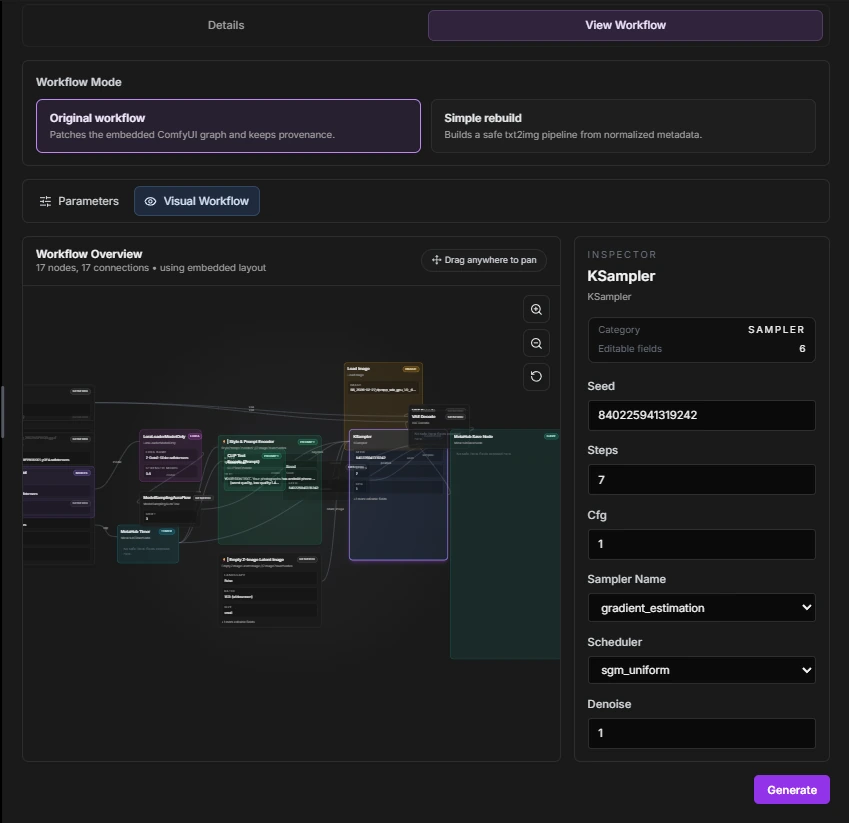
Open a generated file, inspect the graph and normalized metadata, then continue working from the generation context that is still embedded in it.
Review prompts, model names, node data and original workflow payloads from supported outputs.
Send compatible workflows back into ComfyUI and use the embedded workspace and generation flow available in Pro.
A working generation is more useful when you can find its prompt again and see the local models connected to your outputs.
Save positive and negative prompts from your Library, then search and copy them for reuse. Explore Prompt Library.
Organize LoRAs and checkpoints, follow updates and open associated Library images when metadata supports the match. Explore Model Manager.
No. Image MetaHub is a standalone desktop app. The optional MetaHub Save Node can write richer, pre-resolved metadata, but the app also reads standard ComfyUI outputs when their prompt or workflow data is embedded.
No import is required. Image MetaHub indexes the folders you choose in place, and the core library workflow runs locally on your machine.
Yes, when those files still contain embedded prompt or workflow data. Parsing can be partial for highly custom graphs, but the original embedded payload remains available for inspection.
No. Image MetaHub can browse supported image, video, audio and 3D formats in the same library.
Yes. Local indexing, metadata parsing, search, filters, tags and ratings are available for free. Pro adds deeper generation, comparison, analytics and batch workflows.
Start with the free local library. Keep the files and workflows you already have.